


As simple as it gets: activate in Fortnox, connect Claude.
The licence lands on your ordinary Fortnox invoice. No separate contract and no card details.
Assumes you are allowed to buy and activate integrations in Fortnox.
- 99 kr per user Per user and company per month, excluding VAT. No setup fees and no per-call charges.
- 30-day money-back Change your mind and you cancel in Fortnox. No lock-in and no notice period.
- No integration licence The licence lands on the Fortnox invoice you already receive, and needs nothing extra in your Fortnox agreement.
- Several companies is fine Working across several Fortnox companies? Activate the connector in each one, and hold a licence per company.
How to invite more users in the company
The activation covers one company, and every person who is going to use the connector needs a licence of their own. As an administrator you order the licences and invite your colleagues straight from Fortnox, so they get everything they need to start.
-
Step 1. Open Administrera integrationer
Click the company name at the top right in Fortnox and choose Administrera integrationer. It lists every integration connected to your Fortnox.
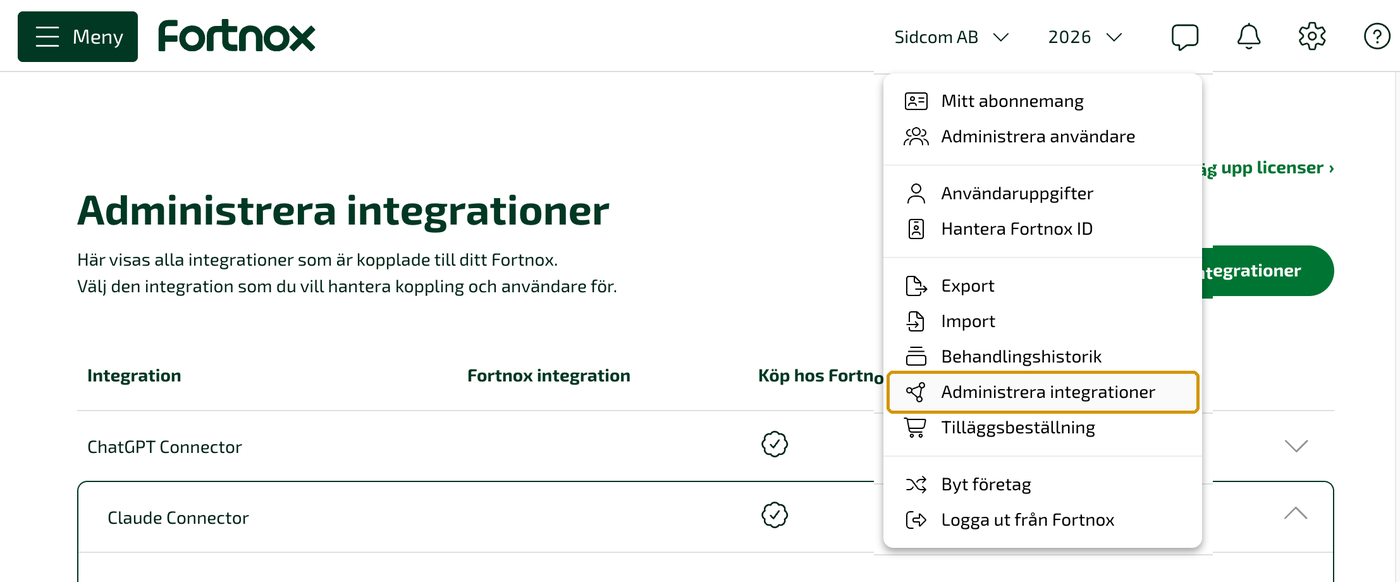
Fortnox → the company name → Administrera integrationer -
Step 2. Order licences and invite the users
Expand Claude Connector in the list. Under Licenser you see how many are in use, and Beställ fler licenser adds the ones you are missing. Under Bjud in användare you send the invitation through Fortnox, or copy a link to send yourself. All it takes is as many licences as people you want to invite.
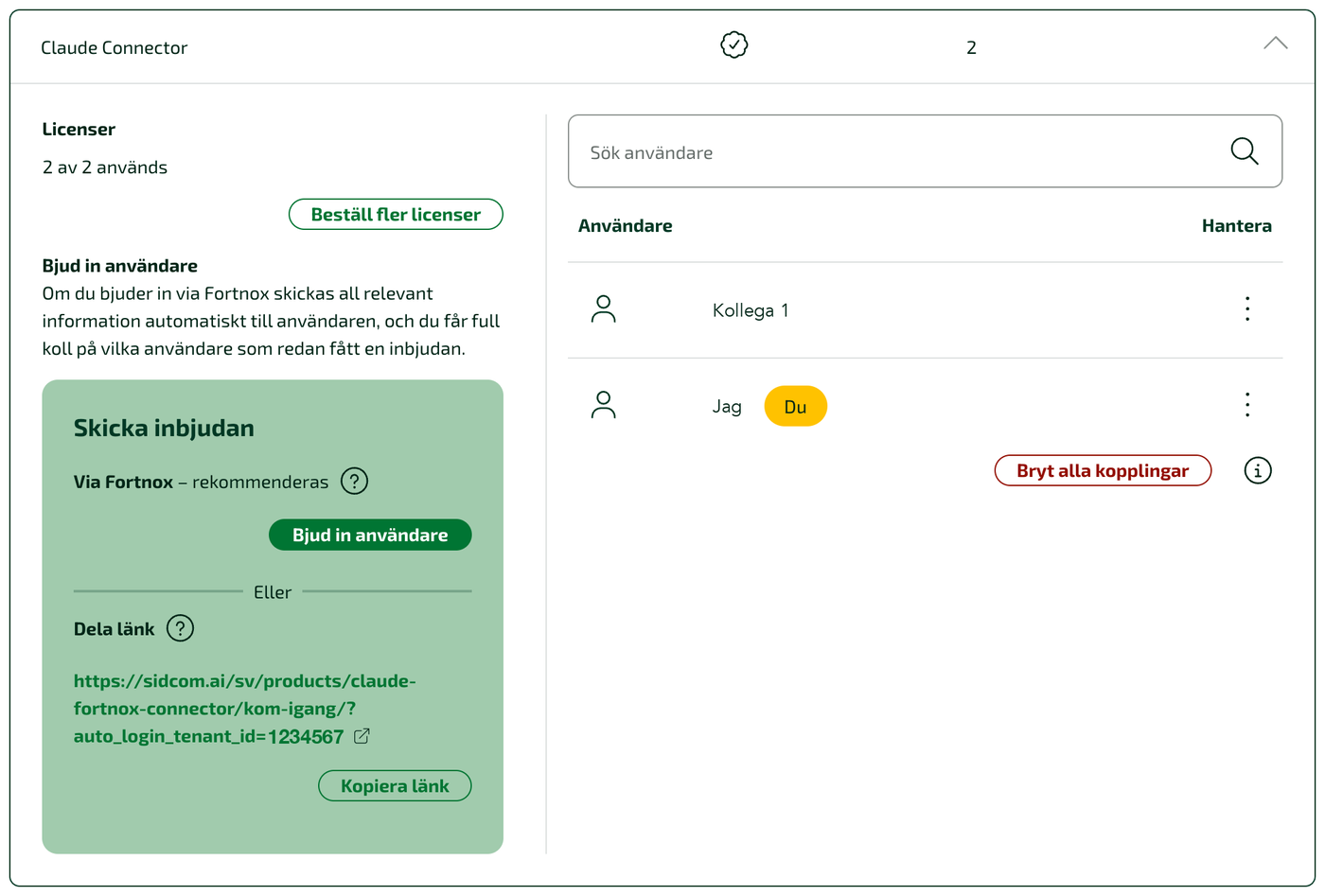
Same thing across several companies: activate the connector in every company you want to use it in, and invite the users there. Each person then adds all of their companies to the same connector in Claude.
// reviews
Others who already did.
Grym koppling som gör att jag enkelt får ut rapporter, personallistor och kan bokföra direkt i Claude.
En fantastisk integration som sparar mig enormt mycket tid. Jag kan söka, analysera, skriva fakturor, tolka, bokföra och betala leverantörsfakturor etc etc direkt genom ChatGPT, integration är Guds gåva, kan det bero på att jag betalar kyrkoskatten 🫣😃 Tack Sidcom tack 🫶🫶 Supporten har dessutom varit personlig och hjälpsam. Fem av fem stjärnor!
En helt ny värld öppnade sig när vi kopplade på ChatGPT Connector. Nu kan vi koppla ihop ekonomi, inköp och försäljning och bygga egna AI-agenter som arbetar direkt med våra system. Vi har dessutom fått riktigt bra support och stöd från Johan och hans team genom hela processen. Rekommenderas varmt!
Anything left?
Who is allowed to activate it?
Whoever may buy and activate integrations in your Fortnox. If you lack the permission, your Fortnox administrator sees it under your agreement and can grant it.
How is it billed?
On your ordinary Fortnox invoice, alongside everything else you have with Fortnox. No separate contract with us and no card details.
What happens right after activating?
You connect Claude to Fortnox and sign in with your own Fortnox account. It takes a few minutes, and the get-started guide walks through every step.
If you get stuck on anything, just say. We answer the same working day, in Swedish or English.